
DXonJet Software Update: Support Auto-Maintenance Program
July 22, 2023My name is Alex, the sales director of DXonJet Printer LTD. It's great to introduce to you our latest UV vertical wall printer, the model VPJet 4.0 LED UV vertical wall printer.
This new type of vertical wall printer incorporates the practical operating experience of our engineers and is developed based on feedback from our customers.

The Challenge of Stability in The Wall Printers.
First of all, let's take a look at the appearance of this machine, which is very sturdy and stable. At the beginning of the design, we discussed whether to create a good-looking printer or a stable one.
I know that there are some printers on the market that are very slim and convenient for transportation, but after testing them, we found that these printers all have a very serious problem, which is instability or shaking.
The shaking of the printer will bring disastrous consequences to the print quality, and many of our customers have complained about this issue.
The shaking of the vertical printer is mainly because it moves in three directions at the same time during work, namely the horizontal X-axis direction, the vertical Y-axis direction, and the front and back Z-axis direction.
In the horizontal direction, the wheels or tracks will move, and in the vertical direction, the printer head will move up and down. The printer head in the front and back Z-axis direction needs to be adjusted in real time because it needs to maintain a fixed distance from the wall.
The movement in these three directions is real-time, and each time it requires acceleration and stopping processes, which brings great challenges to the stability of the printer.

The Structure of VPJet4.0 Wall Printer
Therefore, the DXonJet team aims to create a stable, sturdy, and durable vertical printer. Let us carefully examine the structure of this printer.
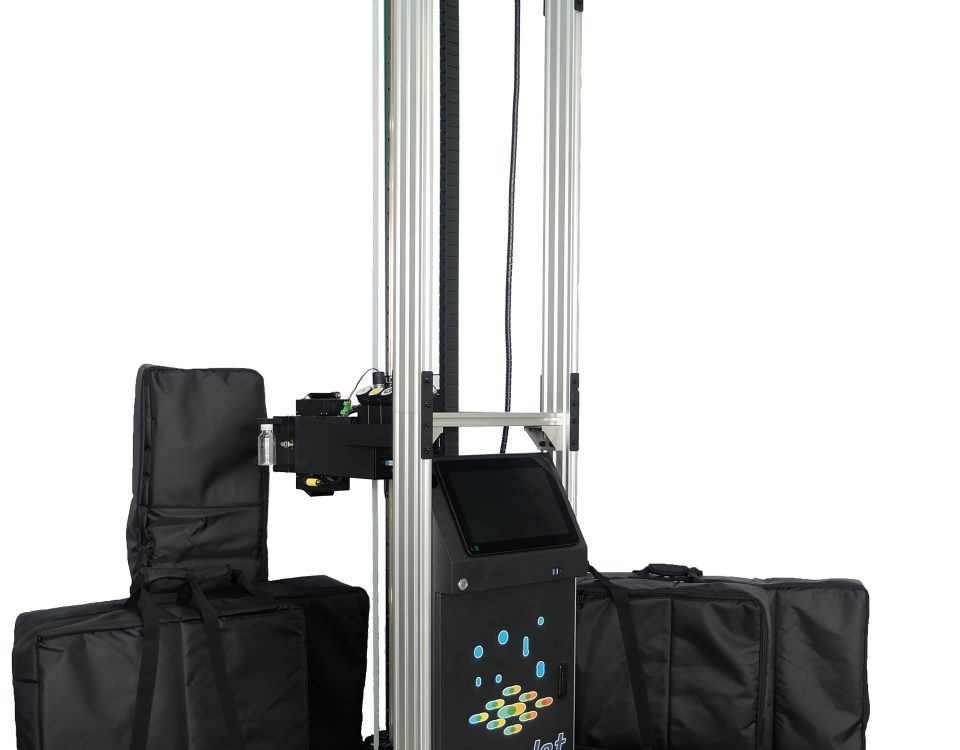
From a structural perspective, the vertical UV printer comprises a base, a casing, a frame structure, a print head assembly, vertical rails, and extensions.
We have given particular attention to increasing the weight of the base and ensuring its flatness during assembly, thus providing a stable center of gravity for the printer.
The VPJet4.0 vertical wall printer platform is made of one complete aluminum metal and weighs 23kg once installed. The frame structure connecting the casing and vertical posts has been designed to prevent any unnecessary movement during operation.
Moreover, we have optimized the motor program of the print head assembly to prevent any shaking of the printer in the forward and backward directions.
How to disassemble and Install VPJet4.0
Although it looks a bit complicated, these components can all be easily disassembled for separate transportation.
Assembling is also a breeze, our structural designer has installed special holes for each component to ensure that operators won't make mistakes and that it only takes one screwdriver to assemble it quickly.
The Vertical Extension
Let's take a look at the vertical bars and extensions. Based on our past experiences and feedback from customers, the splicing of the vertical bars in the vertical direction has two serious problems.
Firstly, the splicing process is extremely cumbersome. Secondly, the effect after splicing is very poor, with too large gaps causing the machine head to make a strange noise when passing through the gaps, which seriously affects the printing results.
The direct consequence is that there will be a thin crack in the image, which is unacceptable for both us and our customers.
Now, the redesigned processing method for the vertical bars has resulted in a significantly simpler splicing process and much smaller gaps, which are visually comparable to a hair.
The machine head component hardly makes any abnormal noise when passing through this gap. This is an important improvement.

The Print Head Unit
Next, let's take a look at the print head unit. This is the most important and also the most expensive component in printer parts. Its value is almost half the value of the entire printer. Most of the printer problems come from the print head unit, as it is the engine of the printer.
Ink enters the damper through the ink cartridge and then enters the print head. The control board inside the print head precisely controls the print head to eject accurate ink droplets to form an image on the medium. This process seems simple, in fact, there are very high requirements for the stability of the program and the design of the print head unit.
At the same time, there are also two Banner Brand sensors and two UV lamps installed on the print head unit. All of these accessories require precise control and cooperation to complete printing an image.
We designed a detachable metal plate on the side of the print head component for convenient maintenance in the future. We also optimized the internal installation structure and used more stable and durable wiring. This is also the experience we gained from past mistakes.

The UV Curing System
A lot of wall printer suppliers only use one UV lamp head to cure UV ink, with one reason being cost-saving. However, from our past experiences and our client's feedback, installing two UV lamp heads is necessary.
The important purpose of the UV lamp is to instantly cure UV ink. If the ink cannot be cured instantly, it will diffuse on the medium or fail to form new colors when mixed with CMYK ink.
Having only one UV lamp installed causes two other problems: it cannot fully scan all the ink, and it cannot cure the ink with maximum power, resulting in some streaks appearing in the image.
By optimizing the power and exposure time of the UV lamp, this issue can be greatly reduced.
Two Driving System on Horizontal
There are two driving modes in the horizontal direction, wheel drive, and track drive.
We have optimized these two driving systems.
First, the wheels. We use smaller wheels so that the print head unit can be closer to the ground, producing larger size of images on the wall.
At the same time, we changed the way the wheels are installed so that there is no abnormal shaking during movement, providing stable and precise movement so that the print head unit can accurately spray images. The previous design was very bad, and many customers always found that the wheels were shaking when installing the printer wheels, which made them very uneasy because it would indeed have a destructive effect on printing accuracy.
As for the track, we redesigned a thinner and more stable track, which doesn't need to be as heavy as before. If your printer prints in an uneven ground environment, you can adjust the level of the track with jacks to ensure horizontal printing, which is very efficient.
If you try to adjust the horizontal level through other methods, it may take you one or two hours. I am not exaggerating, because we also print works for customers in China, so this is our actual experience.

The UV Curable Ink
Talking the UV ink may be the third most important accessory after the print head and control program.
We chose Nazdar brand ink from the United States for a very simple reason: its quality control is very good, the color reproduction is very high, and it is very compatible with the print head we use.
There is a saying in the inkjet printer field: the best print head maintenance solution is ink. You don't need to use extra cleaning fluid to regularly clean the print head, which can actually damage it. What you need to do is use high-quality ink, regularly extract and clean it, and then prevent the UV rays in sunlight from shining on the surface of the print head.
That's it, and that's our experience over the years, shared with you.

The Software
let's talk about the software part. Industrial printers use two types of software: RIP software and printer control software.
The full name of RIP software is Raster Image Processing. It's an important tool that converts RGB images into CMYK images. The precision of its algorithm directly affects the printing effect.
Printer control software sends files generated by RIP software to the control board through instructions, thereby controlling the operation of the print head.
That's the main job of these two software. Of course, in reality, our software has exceptionally strong and rich functionality.
RIP Software
We use FlexiPrint RIP software developed by the American company SAi, as well as the Chinese brand MainTop. FlexiPrint does a good job in color and detail reproduction and supports multiple languages. It is also the world's best-selling RIP software.
Both FlexiPrint RIP Software and MainTop RIP Software have been professionally calibrated ICC Profiles by their engineers for our machines and inks, ensuring accurate and detailed printing without color deviation.
The DXonJet Control Software
The printer control software can also be called GUI software, which stands for Graphical User Interface.
DXonJet software provides a real-time preview function. After opening the RIP, you can see the image on the left. Meanwhile, you can upload multiple print files at once to form a print queue and print as needed. After selecting the desired image to be printed, we can also print only a selected portion of the image using the selection tool.

Returning to the main interface, at the bottom of the image, we can see the real-time printing speed and printing progress. In the lower part of the interface, we can see the amount of ink used in printing.
By the way, the control software integrates a calibration function, which enables us to conveniently calibrate the step data in vertical and horizontal directions.
Based on our experience, wall-mounted printers that are frequently moved, dismantled, and installed tend to accumulate errors in precision. Without calibration, printing accuracy will be greatly affected.
Luckily, we can easily calibrate these values in the control software, which will automatically compensate for the errors in the program.

Besides, we're also adding travel mode and embossed printing mode to the control software.
In travel mode, the printer can automatically perform ink withdrawal and cleaning tasks at regular intervals after being powered on, without the need for manual operation.
The maximum application of the embossed effect is printing braille and images with a touchy feeling.
Upgrading the software can be done remotely without the need for manual burning of new programs.
All software can be operated on a Windows system and supports wireless printing mode. We will equip you with an 11-inch tablet touch computer to run control software and RIP software.


 English
  Español
  Français
  Deutsch
  Italiano
  Nederlands
  Polski
  Русский
  Türkçe
  한국어
한국어  Română
  繁體中文
繁體中文  العربية
  हिन्दी
  日本語
日本語 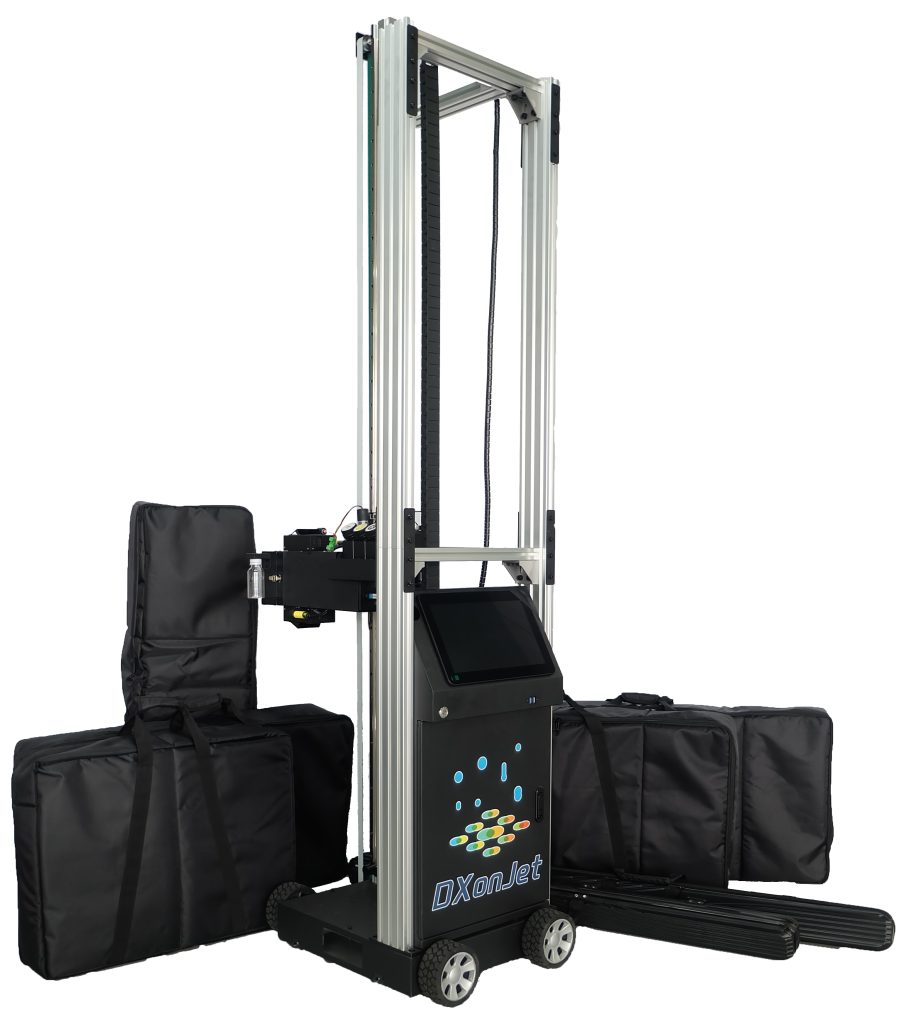
2 Comments
I am intrested in buying VPJet4.0 Vertical Wall Printer Machine.
Do you have anyone that is supporting Your product in Poland?
Hi, Jarek:
Thanks for your interest in our wall printer machine. We have a partner in Poland who can support you. Please contact wallprinters+ in Poland.
Alex